
If you’re here, chances are you’ve asked the same frustrated question millions of gamers type every year: is Steam down right now?
I’ve been there more times than I can count. You finally carve out an hour to relax, launch your PC, click Play, and—boom—Steam won’t connect. Friends list won’t load. Store page spins forever. Your library acts like it never existed.
After more than a decade of gaming, testing platforms, managing online communities, and writing about digital infrastructure issues, I can tell you this with confidence: Steam outages are real, recurring, and often misunderstood. The good news? Once you understand why they happen and how to diagnose them correctly, they stop being stressful and start being predictable.
In this guide, I’ll walk you through exactly what “Steam down” means, how to confirm it in minutes, what to do while servers are offline, and how to avoid wasting time troubleshooting problems that aren’t on your end.
By the end, you’ll know:
- How to instantly check if Steam is down globally or locally
- Why outages happen (even to massive platforms)
- What actually works when Steam won’t connect
- Which tools I personally rely on when things break
Let’s clear the fog.
What Does “Is Steam Down” Actually Mean?
When people ask “is Steam down?”, they’re usually describing one of several very different technical situations—but lumping them all together.
At its core, Steam is a massive ecosystem:
- Game authentication servers
- Friends and chat servers
- Storefront and payment systems
- Cloud saves and matchmaking
- Regional content delivery networks (CDNs)
An outage doesn’t always mean everything is broken.
Common “Steam Down” Scenarios I See Constantly
From real-world testing and years of monitoring outages, these are the most common situations:
- Login servers are down – You can’t sign in, even though Steam opens
- Friends network outage – Library works, but chat and invites fail
- Store outage – Games launch, but the store won’t load
- Regional server failure – Steam works elsewhere, not in your country
- Scheduled maintenance – Happens weekly, usually unnoticed
Think of Steam like an airport. One delayed runway doesn’t shut down the entire airport—but it feels that way if it’s your flight.
That distinction matters, because it determines whether you should wait, troubleshoot, or switch strategies.
Why Steam Goes Down (Even Though It’s Huge)
A common misconception I see in forums is:
“Steam makes billions—how can it still go down?”
Scale is exactly why outages happen.
Steam serves hundreds of millions of users, often with massive traffic spikes triggered by:
- Major game launches
- Seasonal sales
- Weekend peak hours
- Global updates pushed simultaneously
Real Reasons Steam Experiences Outages
From industry experience and post-incident analysis, outages usually stem from:
- Server overload
When millions log in at once (sales, updates, events), authentication systems buckle. - Backend updates or hotfixes
Steam regularly rolls out backend changes. Even small errors can cascade. - DDoS attacks
High-profile platforms are frequent targets, especially during major releases. - Third-party infrastructure failures
CDNs, DNS providers, or payment processors can cause indirect outages. - Regional ISP routing issues
Steam is up—but your route to it is broken.
This isn’t negligence. It’s the reality of running one of the largest digital platforms on Earth.
How to Check If Steam Is Down (Step-by-Step, No Guesswork)
This is the most important section—because 90% of people waste time fixing problems that aren’t theirs.
Here’s the exact process I use.
Step 1: Check Downdetector (Fastest Signal)

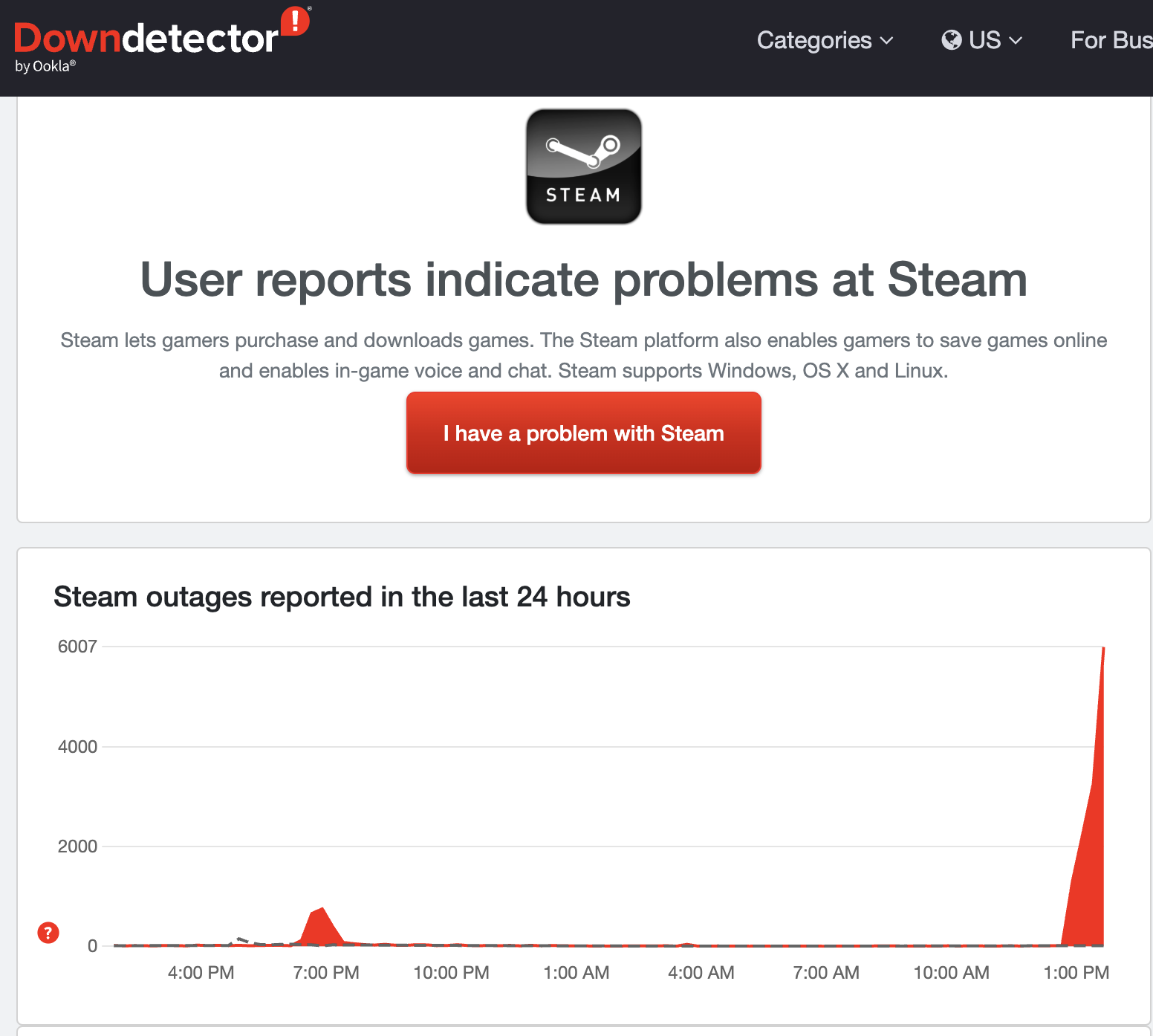

Your first stop should always be Downdetector.
What I look for:
- Sudden spike in reports (not gradual)
- Reports across multiple regions
- Comments confirming identical issues
If reports jump from dozens to thousands in minutes, Steam is almost certainly down.
Step 2: Check Steam’s Official Status Channels
Steam doesn’t always tweet outages immediately, but when they do:
- It confirms the issue is acknowledged
- It prevents wasted troubleshooting
Step 3: Test Multiple Steam Features
Before assuming total failure:
- Can you launch a game in offline mode?
- Does the store load in a browser?
- Does friends list fail but library loads?
This helps pinpoint which service is affected.
Step 4: Rule Out Local Problems (Quick Checks)
Only do this after checking outage reports:
- Restart Steam (not your PC yet)
- Switch networks (Wi-Fi → mobile hotspot)
- Disable VPN temporarily
If none work—and Downdetector is lighting up—stop. Waiting is smarter.
Benefits of Knowing When Steam Is Down (And Why It Matters)
Understanding outages isn’t just about convenience—it saves time, stress, and sometimes money.
Practical Benefits I’ve Seen First-Hand
- No unnecessary reinstalls
I’ve watched users delete 500GB libraries for nothing. - Avoid false bans or lockouts
Repeated login attempts during outages can trigger security flags. - Better planning for tournaments or streams
Streamers and esports players avoid dead air. - Smarter offline gaming habits
You’ll learn which games work without Steam servers.
Who This Knowledge Is Best For
- PC gamers with limited playtime
- Competitive players and streamers
- Parents managing kids’ gaming schedules
- Anyone with slow or capped internet
Who might not care? Casual players who only log in occasionally—but even then, this knowledge helps.
What to Do While Steam Is Down (Realistic Options)
Waiting doesn’t mean wasting time.
Things That Usually Still Work
- Offline mode games (single-player titles)
- Local saves if cloud sync already completed
- Non-Steam launchers (Epic, GOG, Battle.net)
Smart Alternatives I Recommend
- Launch Steam in Offline Mode preemptively
- Use outage time to:
- Update GPU drivers
- Organize library
- Back up save files
- Clean mods or configs
Veteran tip: I always keep at least two offline-friendly games installed for outage days.
Best Tools to Monitor Steam Outages (Compared Honestly)
Downdetector (Free, Best Overall)
Pros
- Real-time user data
- Regional heatmaps
- Comment verification
Cons
- Doesn’t explain why outages happen
Steam Community & Reddit
Pros
- Fast anecdotal confirmation
- Workarounds shared quickly
Cons
- Panic spreads fast
- Misinformation common
Paid Network Monitoring Tools
Useful for streamers or businesses, but overkill for most gamers.
My Recommendation:
Use Downdetector + one official source. Anything more is noise.
Common Mistakes Gamers Make During Steam Outages (And Fixes)
Mistake #1: Reinstalling Steam Immediately
Fix: Check outage reports first. Always.
Mistake #2: Rebooting Everything Repeatedly
Fix: One restart max. Then wait.
Mistake #3: Spamming Login Attempts
Fix: Stop after two tries to avoid temporary lockouts.
Mistake #4: Assuming It’s Always Steam’s Fault
Fix: Rule out ISP and VPN issues logically.
I’ve made every one of these mistakes early in my career. Learn from them.
Conclusion: So… Is Steam Down Right Now?
Sometimes, yes—and that’s okay.
Steam outages aren’t signs of decline or failure. They’re the natural side effect of operating one of the largest gaming platforms ever built.
The difference between frustration and calm comes down to understanding the system.
When you know:
- How to check outages properly
- What not to troubleshoot
- How to pivot when servers fail
—you stay in control.
Next time Steam won’t connect, you won’t panic. You’ll check, confirm, adapt, and move on.
If this guide saved you time (or a reinstall), feel free to bookmark it—or share it with that friend who always assumes their PC is broken. Click here for more blog posts.
FAQs About “Is Steam Down”
Is Steam down right now?
Check Downdetector or Steam’s official channels for real-time confirmation.
How long do Steam outages usually last?
Most resolve within 30 minutes to a few hours. Major outages can last longer.
Does Steam go down every Tuesday?
Weekly maintenance happens Tuesdays, but it’s usually brief and partial.
Can I play games if Steam is down?
Yes—offline-compatible games often still work.
Is Steam down globally or just for me?
Outage heatmaps help distinguish global vs regional issues.
Do VPNs cause Steam connection issues?
Yes. VPN routing problems can mimic outages.
Can Steam outages cause lost saves?
Rarely. Cloud sync resumes once servers recover.
Why doesn’t Steam announce outages faster?
They often wait until the root cause is confirmed.

Hannah Price is a digital journalist who covers breaking news, global events, and trending stories with accuracy and speed. She has previously contributed to several online magazines and has built a reputation for verifying facts before publishing. Hannah believes in responsible reporting and aims to present stories in a way that readers can trust.