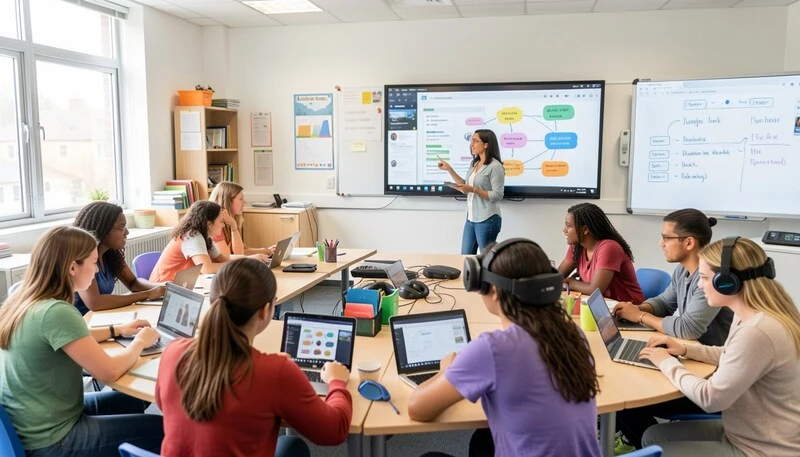
We are living through the most significant transformation in education since the invention of the printing press. Artificial intelligence is drafting lesson plans, virtual reality is transporting students to ancient Rome, and a student in rural Kansas can now attend a live masterclass taught by an expert in Tokyo. The question is no longer whether technology belongs in the classroom — it is how to use it wisely, equitably, and effectively.
This guide was written for every stakeholder in a student’s education: the teacher looking for practical, tomorrow-ready strategies; the administrator navigating budgets and infrastructure; and the parent trying to understand what responsible technology use looks like at home and at school. Whether you are brand new to EdTech or looking to deepen a practice you have been building for years, you will find something here.
What follows is a thorough examination of the what, why, how, and what’s next of technology in the classroom — grounded in research, enriched with real examples, and updated for 2025.
What Is Technology Integration? (Beyond the Gadgets)
When most people picture technology in the classroom, they picture a room full of laptops or a shiny interactive whiteboard. But technology integration is far more than placing devices in students’ hands. The International Society for Technology in Education (ISTE) defines it as the use of technology to enhance, amplify, and transform learning — not merely to replicate what was already possible on paper.
True integration means the technology is invisible. A student does not think ‘I am using Google Docs’; she thinks ‘I am co-writing a story with my classmate in real time.’ A teacher does not think ‘I am running a Kahoot! quiz’; he thinks ‘I am getting instant feedback on whether my class understands fractions before we move on.’ The tool disappears into the learning goal.
This distinction matters because it shifts the conversation from purchasing decisions to pedagogical decisions. The best-equipped classroom in the district will underperform a thoughtfully designed low-tech classroom if the teacher has not been given time, training, and autonomy to embed technology into meaningful learning experiences.
A Brief History of Technology in the Classroom
Resistance to new classroom technology is, ironically, a very old tradition. Socrates argued that writing would weaken memory. Administrators in the 1800s worried that the newly introduced pencil would make students sloppy. Every generation inherits the anxiety of the last — and then, eventually, the new tool becomes indispensable.
| Era | Milestone |
| 1800s | Chalkboards replace sand trays; pencils replace slates. Both were controversial. |
| 1920s–40s | Radio and film projectors enter classrooms, promising to revolutionize education. |
| 1950s–60s | Television is introduced. The Ford Foundation funds large-scale ‘educational TV’ experiments. |
| 1970s–80s | The personal computer arrives. Oregon Trail becomes one of the first widely used educational software programs. |
| 1990s | The World Wide Web opens infinite informational access. Computer labs become standard. |
| 2000s | Interactive whiteboards (IWBs), Learning Management Systems (LMS), and 1:1 laptop initiatives emerge. |
| 2010s | Tablets (iPads), Chromebooks, cloud computing, and game-based learning platforms (Kahoot!, Duolingo) go mainstream. |
| 2020 | The COVID-19 pandemic forces a global remote-learning experiment, accelerating EdTech adoption by a decade. |
| 2022–Present | Generative AI (ChatGPT, etc.), AR/VR headsets, and adaptive learning platforms redefine what is possible. |
Types of Technology Shaping Today’s Classrooms
Hardware: The Tools in Students’ Hands
Hardware is the most visible layer of classroom technology — and the most expensive to get wrong. Different devices suit different learning goals and grade levels.
- Laptops and Chromebooks: The workhorse of the modern classroom. Chromebooks are popular in K–12 for their low cost, durability, and seamless integration with Google Workspace. Full laptops are better suited to high school students who need specialized software (design, programming, data analysis).
- Tablets (iPads and Android): Ideal for K–5 classrooms. Touchscreen interfaces are intuitive for young learners, and the app ecosystem for creative and literacy-based learning is unmatched. Shared carts work well at the elementary level; 1:1 programs shine in grades 4 and up.
- Desktop Computers: Declining in popularity but still relevant in dedicated computer labs and for tasks demanding raw processing power, such as video editing or advanced programming.
- Interactive Flat Panels (IFPs) and Whiteboards: The modern successor to the projector and overhead screen. Today’s IFPs are large, touch-responsive displays that allow teachers and students to annotate, drag, collaborate, and even run apps directly on the screen. They are the anchor of most new classroom builds.
- Smartphones and BYOD Devices: Many schools operate Bring Your Own Device (BYOD) policies, particularly at the high school level. Smartphones are powerful learning tools when managed well — and significant distractions when they are not.
- Projectors and Document Cameras: Lower-cost alternatives for whole-class display. Document cameras remain valuable for showing hands-on work (science specimens, student writing, math manipulatives) in real time to the whole class.
Software and Platforms: The Digital Learning Environment
Hardware is only as good as the software running on it. The digital learning environment encompasses everything from the platforms that organize coursework to the apps that make a single lesson more engaging.
- Learning Management Systems (LMS): Platforms like Google Classroom, Canvas, Blackboard, Moodle, and Schoology serve as the central hub — a place to assign work, post resources, communicate with students, and track grades. An effective LMS reduces administrative burden and keeps students organized.
- Game-Based Learning Platforms: Kahoot!, Gimkit, Blooket, and Quizlet Live transform review sessions and formative assessment into competitive games. Research consistently shows that game-based learning increases engagement and short-term retention.
- Productivity and Collaboration Suites: Google Workspace (Docs, Slides, Sheets, Drive) and Microsoft 365 (Word, PowerPoint, Teams) teach the tools students will use in college and careers, while enabling real-time peer collaboration.
- Communication Platforms: Tools like ClassDojo, Remind, and Seesaw keep parents informed and give students age-appropriate communication practice.
- Specialized and Subject-Specific Apps: Duolingo for language learning, Desmos and GeoGebra for math, Scratch for coding, Adobe Express for creative projects — the catalog of high-quality, often free educational apps is enormous and growing.
- AI-Powered Tools: Tools like Khan Academy’s Khanmigo, Grammarly, and emerging AI tutors use large language models to provide personalized guidance, instant feedback, and adaptive practice.
The Top 10 Proven Benefits of Technology in the Classroom
The research base for educational technology is extensive — and nuanced. Technology is not a magic bullet. Its impact depends heavily on implementation quality, teacher preparation, and alignment with learning goals. That said, when used well, the evidence for the following ten benefits is compelling.
1. Boosts Student Engagement and Participation
The National Survey of Student Engagement (NSSE) has repeatedly found that interactive learning experiences — many of which are enabled by technology — produce higher levels of engagement than passive listening. Digital tools make it possible for every student to respond simultaneously (polling tools), compete on equal footing (game-based platforms), and create rather than just consume (video projects, digital portfolios). Engagement is not just about fun; it is the precondition for learning.
2. Prepares Students for Future Careers
The World Economic Forum projects that the majority of jobs available to today’s kindergarteners do not yet exist. What does exist is a near-universal requirement for digital literacy — the ability to find, evaluate, create, and communicate information using digital tools. Teaching with technology is, fundamentally, teaching students how to work and think in a digital world. Every Google Slide presentation, collaborative spreadsheet, and coding exercise is career preparation.
3. Personalizes Learning for Every Student
Traditional whole-class instruction works well for students who happen to be in the middle of the ability distribution. For everyone else, it is too fast, too slow, or simply off-target. Adaptive learning platforms adjust in real time to each student’s performance. A student who masters multiplication early can move on to division immediately; a student who needs more time receives additional scaffolded practice without holding the class back or feeling embarrassed. This is differentiated instruction at a scale no human teacher can achieve alone.
4. Encourages Collaboration and Communication
A 2010 study from Walden University found that students who used technology for collaborative projects reported significantly higher satisfaction and skill development in teamwork than those who did not. Shared Google Docs, online whiteboards like Miro, and video conferencing tools allow students to collaborate asynchronously, across classrooms, and even internationally — skills that map directly to modern professional environments.
5. Provides Instant Access to Information and Resources
Before the internet, the depth of a student’s research was limited by what was in the school library. Today, a middle schooler in a small-town school can read the same primary sources as a graduate student at Harvard, watch a NASA scientist explain black holes, and access open educational resources (OER) in dozens of languages. The quality of information has never been higher — which makes media literacy and source evaluation more important than ever.
6. Connects Classroom Learning to the Real World
Virtual field trips powered by Google Expeditions or VR headsets take students to the Great Barrier Reef, the Smithsonian, or the surface of Mars — without a permission slip. Video calls with guest experts eliminate the geographic barrier to authentic mentorship. Project-based learning facilitated by technology allows students to solve real community problems, publish actual writing, and build software that real people use. The classroom wall becomes permeable.
7. Facilitates Instant Feedback and Data-Driven Instruction
One of the most powerful — and underutilized — benefits of EdTech is the data it generates. Formative assessment tools like Socrative or ExitTicket give teachers a real-time picture of student understanding before a lesson ends. LMS platforms track assignment completion, time-on-task, and performance trends. AI grading tools can provide line-level feedback on student writing in seconds. Teachers who use data to guide instruction consistently outperform those who rely on intuition alone.
8. Makes Learning Interactive and Immersive
Augmented reality apps overlay digital information on the physical world: a student points a tablet at a page in a science textbook and watches a 3D model of the human heart begin to beat. Simulations let chemistry students run experiments that would be too dangerous or expensive in a physical lab. These experiences do not replace direct instruction — they deepen it, providing the concrete, sensory anchor that makes abstract concepts stick.
9. Develops Essential Digital Citizenship Skills
Digital citizenship — the responsible, ethical, and safe use of technology — is not taught; it is practiced. Every time a student learns to cite an online source, evaluate a suspicious headline, or navigate a disagreement in a shared digital space, they are building a skill they will rely on for the rest of their lives. Schools that integrate technology thoughtfully build digital citizenship into the fabric of daily learning.
10. Improves Retention and Deepens Understanding
Cognitive science research supports multimedia learning: people generally learn more deeply from words and pictures together than from words alone. Interactive notes, video explanations, and digital manipulatives activate multiple memory pathways simultaneously. Students who create digital artifacts — videos, infographics, podcasts — must synthesize and explain information in their own words, which is one of the most reliable pathways to lasting understanding.
Overcoming the Key Challenges of Technology in the Classroom
An honest guide to EdTech acknowledges its challenges — not to discourage adoption, but to give educators the tools to navigate them. The following are the most commonly cited barriers, along with practical, proven strategies for addressing each one.
1. Managing Distractions and Screen Time
The same device that opens a world of learning also opens YouTube, social media, and group chats. Research by the London School of Economics found that banning smartphones in schools improved academic performance among lower-achieving students by 14%. The lesson is not that technology is bad — it is that boundaries matter.
Practical strategies:
- Establish clear, consistent device-use norms at the start of every school year.
- Use classroom management software (GoGuardian, Securly) to monitor and restrict access on school devices.
- Design tasks that require active creation, not passive consumption — it is hard to wander when you are producing.
- Model healthy screen habits explicitly, including discussion of social media’s design to be addictive.
2. Bridging the Digital Divide and Ensuring Equity
The digital divide has evolved. In 2025, most students have access to a device — the more pressing issue is the homework gap: roughly 16 million K–12 students in the U.S. still lack reliable high-speed internet at home, according to Common Sense Media. For these students, a homework assignment requiring online research or an LMS submission is inaccessible.
Practical strategies:
- Advocate for school-loaned mobile hotspots for students without home internet.
- Design a mix of online and offline tasks so all students can complete meaningful work at home.
- Survey families at the start of each school year about technology access.
- Familiarize yourself with district, state, and federal programs (E-Rate, Affordable Connectivity Program) that subsidize access.
3. Providing Effective Teacher Training and Support
Technology is only as good as the teacher using it. A 2022 survey by the EdWeek Research Center found that fewer than 30% of teachers felt ‘very prepared’ to integrate technology effectively — not because they lacked intelligence or willingness, but because professional development was often one-time, generic, and disconnected from their actual classroom needs.
Practical strategies:
- Advocate for embedded, ongoing professional development — not one-day workshops.
- Seek out peer learning communities (PLCs), instructional technology coaches, and online educator networks (e.g., Twitter/X #EdChat communities).
- Start small: master one tool before adding another.
- Give yourself permission to learn alongside your students; modeling a growth mindset is itself excellent teaching.
4. Working with Tight Budgets
Technology is expensive, and school budgets are rarely generous. A one-time device purchase is only the beginning: factor in licensing, maintenance, charging infrastructure, technical support, and replacement cycles.
Practical strategies:
- Prioritize free or freemium tools (Google Workspace, Khan Academy, Canva for Education) before purchasing.
- Explore grant opportunities: DonorsChoose for small classroom needs, E-Rate for infrastructure, federal Title IV-A funds for well-rounded educational opportunities.
- Consider the total cost of ownership (TCO) across five years, not just the sticker price.
- Shared device carts can reduce per-student costs at the elementary level.
5. Balancing Screen Time with Face-to-Face Interaction
Social-emotional development requires human connection. Concerns about reduced eye contact, weakened handwriting, and shallow interpersonal skills in tech-heavy classrooms are not unfounded — but they are manageable.
Practical strategies:
- Use technology for tasks it does uniquely well (collaboration at scale, instant feedback, simulation) and preserve face-to-face time for discussion, debate, and relationship-building.
- Schedule deliberate ‘unplugged’ activities: Socratic seminars, hands-on science, physical movement.
- Blended learning models — alternating between direct instruction, small group work, and individual digital practice — strike a natural balance.
6. Ensuring Data Privacy and Student Safety
Every app a school district adopts collects data. The questions educators and administrators must ask: What data is collected? Who can access it? How is it stored? Federal laws (FERPA, COPPA) provide baseline protections, but compliance varies widely among EdTech vendors.
Practical strategies:
- Use only tools that have been vetted and approved by your district’s technology department.
- Teach students explicitly about digital footprints, privacy settings, and what it means to agree to a Terms of Service.
- Avoid collecting more student data than is pedagogically necessary.
- Review vendor privacy policies annually — they change.
How to Implement Technology by Grade Level
One of the most persistent gaps in EdTech guidance is the assumption that what works in a high school calculus class also works in a kindergarten reading circle. It does not. Effective technology integration is developmentally appropriate technology integration.
Elementary School (K–5): Building Foundations
Young children are natural explorers, and the right technology amplifies their curiosity without replacing the tactile, social learning experiences that are developmentally essential at this stage.
- Prioritize creative and interactive apps over passive video consumption. ABCmouse, Starfall, and Epic! for reading; DreamBox and ST Math for numeracy.
- Introduce basic keyboard and mouse skills in grades 2–3; touch-first interfaces (tablets) are more intuitive for K–1.
- Use technology for storytelling: apps like Book Creator allow even pre-literate students to record audio and combine it with illustrations to create digital books.
- Keep individual screen time short — 15 to 20 minutes per session — and always pair it with discussion or a physical follow-up activity.
- Focus on foundational digital citizenship: online safety, personal information, and kind communication.
- Involve parents. Use platforms like Seesaw to share student work and model how families can support learning at home.
Middle School (Grades 6–8): Fostering Independence and Critical Thinking
Middle school is the ideal window to build the independent, responsible technology habits that students will carry into high school, college, and beyond. It is also the stage where distractions — and peer pressure — are most acute.
- Emphasize research skills: teach students to evaluate sources using the SIFT method (Stop, Investigate the Source, Find better coverage, Trace claims). Tools like EasyBib support citation practice.
- Introduce collaborative productivity tools: shared Google Docs for group projects, shared Slides for presentations, shared Sheets for data collection.
- Begin coding: Scratch, Code.org, and MakeCode are visual-first entry points that build computational thinking without requiring syntax memorization.
- Use data visualization tools to make math and science concrete — Desmos, Google Sheets charts, and Gapminder are accessible and engaging.
- Deepen digital citizenship education: plagiarism, cyberbullying, misinformation, and managing online identity.
- Give students choice in how they demonstrate learning: a video essay, a podcast, a website, or a traditional written report are all legitimate formats.
High School (Grades 9–12): Preparing for College and Careers
High school students are capable of using the same tools as working professionals. Technology integration at this level should be less about managing screen time and more about developing the sophisticated, purposeful habits that will serve students in higher education and the workforce.
- Master productivity suites deeply: go beyond basic Google Docs and Word — teach students Pivot Tables, advanced formulas, mail merge, and presentation design principles.
- Introduce domain-specific tools: Adobe Creative Suite for design/media courses, Python or JavaScript for computer science, ArcGIS for geography and social studies, lab simulation software for AP sciences.
- Build digital portfolios using platforms like Google Sites, Wix for Education, or Notion — these become powerful artifacts for college applications and job interviews.
- Engage with AI tools ethically: teach students to use AI writing assistants as thinking partners, not ghostwriters. Discuss academic integrity, prompt engineering, and how to fact-check AI outputs.
- Assign real audiences: students who publish a blog post, submit a letter to a local newspaper, or present to a community organization are engaging in authentic communication.
- Encourage student leadership: peer technology mentors, student-run tech support programs, and student advisory boards on technology policy build agency and genuine expertise.
Actionable Strategies: How to Choose and Use EdTech Effectively
The SAMR Model: A Framework for Meaningful Integration
Developed by Dr. Ruben Puentedura, the SAMR model gives teachers a simple ladder for evaluating whether their technology use is truly transforming learning or simply substituting for existing methods. The four levels, from lowest to highest impact, are:
- Substitution: Technology acts as a direct tool substitute, with no functional change. Example: students type an essay in Google Docs instead of handwriting it. This is valid — but it is the floor, not the ceiling.
- Augmentation: Technology substitutes with some functional improvement. Example: students type an essay in Google Docs and use the built-in spelling/grammar tools. Small gains, low transformation.
- Modification: Technology allows for significant task redesign. Example: students co-write an essay in real time using shared Google Docs and leave comments for each other. Collaboration at scale becomes possible.
- Redefinition: Technology allows for the creation of new tasks previously inconceivable. Example: students co-author a digital book with peers in three countries, embed multimedia evidence, publish it publicly, and respond to reader comments. This is the goal.
The SAMR model is not prescriptive — not every lesson needs to reach Redefinition. But it is a useful prompt: before using a tool, ask yourself, ‘Am I substituting, or am I transforming?’
A Teacher’s Framework for Choosing the Right Tool
With thousands of EdTech tools available, the hardest question is not ‘what’s new?’ but ‘what’s right for this learning objective?’ Use this four-question filter before adopting any new technology:
- What is the learning goal? Define it before looking at tools, not after.
- Does this tool do something a simpler approach cannot? If you can achieve the same result with a whiteboard, use the whiteboard.
- What will students DO with this tool? Active use (creating, analyzing, discussing) outperforms passive use (watching, scrolling) every time.
- What is the total cost — in time, money, privacy, and attention — of adopting this tool?
Quick-Win Ideas You Can Use Tomorrow
Not every technology integration needs to be a unit-long project. Here are low-prep, high-impact ideas:
- Run a live poll with Mentimeter or Poll Everywhere to gauge prior knowledge at the start of a unit.
- Replace a paper exit ticket with a quick Google Form — the data is automatically organized and searchable.
- Use a shared Google Slide deck where each student owns one slide to build a class-generated study guide.
- Record a two-minute ‘mini-lesson’ video for students who were absent or need to re-watch an explanation.
- Set a countdown timer on the board for work sessions — students benefit from visible time cues.
- Use Flipgrid (Flip) for video discussion boards where introverted students often thrive.
- Start a class playlist on Spotify for focus music during independent work — building community through small shared rituals.
The Future of the Classroom: Trends to Watch
The Rise of Artificial Intelligence in Education
No technology trend has generated more excitement — or more anxiety — in education than artificial intelligence. The rapid advancement of large language models (LLMs) like those powering ChatGPT and Google Gemini has fundamentally changed the conversation around student writing, critical thinking, and academic integrity.
The most valuable framing is not ‘how do we stop students from using AI?’ but ‘how do we teach students to use AI well?’ AI tools can serve as infinitely patient tutors, brainstorming partners, writing coaches, and research accelerators. Khan Academy’s Khanmigo AI tutor can walk a student through a math problem using the Socratic method, asking guiding questions rather than simply providing answers.
For teachers, AI can draft differentiated versions of a worksheet, generate discussion questions at Bloom’s Taxonomy levels, suggest accommodations for specific learning profiles, and provide feedback on student writing at scale. None of this replaces teacher judgment — but it can dramatically reduce the administrative burden that keeps teachers from spending time on what matters most: relationships and instruction.
Key consideration: AI literacy — the ability to understand, evaluate, and use AI tools effectively and ethically — is fast becoming a core 21st-century skill. Schools that begin teaching AI literacy now will graduate students who are prepared to thrive; those that ignore it will graduate students who are already behind.
Immersive Learning with Augmented Reality (AR) and Virtual Reality (VR)
Augmented reality overlays digital content on the physical world, while virtual reality immerses users in entirely digital environments. Both are moving from expensive novelties to accessible classroom tools. Applications include:
- Virtual field trips to locations otherwise inaccessible (the Amazon rainforest, the International Space Station, historical sites).
- 3D science models that students can rotate, dissect, and interact with — making abstract anatomy, chemistry, and physics concrete.
- Immersive language learning environments that simulate real-world conversations in target languages.
- Architectural and engineering visualization for career and technical education (CTE) courses.
- Social-emotional learning simulations that build empathy by placing students in unfamiliar perspectives.
The barrier to entry is falling fast. Many AR experiences require nothing more than a smartphone and a free app. As headset costs continue to decline and Wi-Fi infrastructure improves, immersive learning will shift from pilot programs to mainstream practice.
Data-Driven Personalized Learning Paths
Adaptive learning platforms — software that adjusts content difficulty and pacing in real time based on each student’s responses — are arguably the most powerful and underappreciated trend in EdTech. Platforms like DreamBox (mathematics), Lexia (literacy), and IXL generate thousands of data points per student per session, building a granular picture of each learner’s strengths, gaps, and pace.
When this data is surfaced thoughtfully to teachers, it transforms instruction. Instead of relying on gut instinct about who is struggling, a teacher can pull a report on Monday morning that shows, precisely, which students need intervention on equivalent fractions before the class moves forward. This is differentiated instruction powered by evidence.
The Modern Digital Divide: From Access to Equity
The conversation about the digital divide has matured. The goal is no longer simply to put a device in every student’s hand — that milestone is largely achieved in most districts. The new frontier is equitable quality: equal access to high-speed internet, to well-maintained devices with up-to-date software, to teachers who are expertly trained in digital pedagogy, and to a curriculum that prepares all students — not just those in well-resourced schools — to be confident, critical, creative technology users.
Achieving this requires systemic commitment: sustained infrastructure funding, meaningful professional development, curriculum audits, and community partnerships. The schools that will close the equity gap are those that treat digital inclusion not as a hardware problem, but as a whole-school-community commitment.
faqs
What are the main benefits of using technology in the classroom?
The most well-supported benefits include increased student engagement, personalized learning through adaptive platforms, preparation for digital careers, enhanced collaboration, instant access to information, data-driven instruction, and the development of digital citizenship skills. The key is intentional implementation — the tool must serve the learning goal, not the other way around.
What are the biggest challenges of technology in education?
The most commonly cited challenges are managing student distraction, bridging the digital divide and homework gap, providing effective teacher professional development, working within tight budgets, protecting student data privacy, and balancing screen time with face-to-face learning experiences.
How can teachers use technology to engage students?
The most effective engagement strategies include game-based learning platforms (Kahoot!, Blooket), student choice in how they demonstrate learning (videos, podcasts, websites), real-time polling for formative assessment, collaborative digital projects with authentic audiences, and AR/VR experiences that make abstract concepts concrete.
What is the digital divide and how does it affect students?
The digital divide is the gap between students who have equitable access to technology and those who do not. In 2025, this gap is less about device ownership and more about reliable home internet access (the ‘homework gap’), device quality, and the quality of technology instruction they receive. Students without home internet are effectively excluded from homework, research, and online learning platforms.
What is the SAMR model?
SAMR (Substitution, Augmentation, Modification, Redefinition) is a four-level framework developed by Dr. Ruben Puentedura for evaluating the degree to which technology transforms learning. The higher the level, the more fundamentally technology is changing what is possible in the classroom. It is a tool for reflection, not a rigid prescription.
How is Artificial Intelligence (AI) being used in education?
AI is being used in education for personalized tutoring (Khan Academy’s Khanmigo), adaptive practice platforms, AI writing assistants and coaches, automated grading and feedback tools, lesson planning and differentiation support for teachers, and AI literacy curriculum. Schools are also actively developing policies around academic integrity in the age of AI.
What is digital citizenship and why is it important?
Digital citizenship is the responsible, ethical, and safe use of technology and the internet. It encompasses skills like evaluating online sources, protecting personal privacy, understanding digital footprints, practicing kind communication online, and using AI tools ethically. It is important because students will spend enormous portions of their personal and professional lives in digital spaces — and schools have a responsibility to prepare them.
How can I manage student distractions from devices?
Effective strategies include establishing clear, consistent norms at the start of the year; using classroom management software to monitor and restrict access on school devices; designing tasks that require active creation rather than passive consumption; and modeling healthy digital habits explicitly. Research suggests that visible engagement tasks — where distraction is immediately obvious — are among the most effective deterrents.
What technology works best for elementary school students?
Touch-first devices (tablets) are most intuitive for K–2 students. Effective apps include ABCmouse, Starfall, Epic!, DreamBox, and Book Creator. Key principles: keep screen time short (15–20 minutes), always pair digital activities with physical or social follow-up, focus on creation and interaction over passive consumption, and involve parents through platforms like Seesaw.
How can schools get funding for classroom technology?
Key funding sources include the federal E-Rate program (internet and telecom infrastructure), Title IV-A funds under ESSA (well-rounded educational opportunities), state technology grants, DonorsChoose.org for classroom-level needs, and corporate education partnerships. Administrators should also consider total cost of ownership — not just the purchase price — and explore cost-effective shared device models.
Conclusion: Technology as a Means, Not an End
The history of technology in the classroom teaches us two things. First, every new tool is initially met with resistance and eventually becomes unremarkable. Second, the tool itself has never been the point — the learning has always been the point. A chalkboard, a computer, an AI tutor: all are instruments in service of a human endeavor. The measure of good teaching has not changed in twenty-five centuries. It is whether students understand more, can do more, and are better equipped to live flourishing lives than they were before.
What has changed is the scale of what is possible. A teacher with the right tools, the right training, and the right philosophy can reach every student in ways that were inconceivable a generation ago. Personalized learning, global collaboration, immersive experience, and data-informed instruction are no longer the province of elite institutions. They are available to any school willing to invest not just in devices, but in the professional development, infrastructure, and equity commitments that make those devices meaningful.
Use this guide as a living document. Return to it as your practice evolves, as new tools emerge, and as the needs of your students change. The best classroom technology is the kind you will update, revisit, and — eventually — replace with something even better.

Adrian Cole is a technology researcher and AI content specialist with more than seven years of experience studying automation, machine learning models, and digital innovation. He has worked with multiple tech startups as a consultant, helping them adopt smarter tools and build data-driven systems. Adrian writes simple, clear, and practical explanations of complex tech topics so readers can easily understand the future of AI.