

Virtualization technology is one of those ideas that sounds abstract until you’ve lived without it—and then tried to scale. I’ve seen teams go from juggling fragile physical servers like fine china to spinning up entire environments in minutes, simply because they finally embraced virtualization the right way.
At its core, virtualization technology is the practice of using software to create virtual versions of physical resources—servers, operating systems, storage, networks, even desktops. Instead of one physical machine doing one job, a single piece of hardware can safely run multiple isolated workloads, each believing it owns the system.
Think of it like owning a single, powerful apartment building instead of dozens of single-family homes. Each tenant has their own locked unit, utilities, and privacy, but the structure, plumbing, and electricity are shared intelligently. That’s virtualization in plain language.
What most beginner explanations miss is why this matters beyond cost savings. Virtualization technology fundamentally changes how you think about infrastructure:
You stop planning around hardware limitations and start designing around outcomes.
You stop fearing failure because systems can be cloned, restored, or migrated.
You stop overbuying “just in case” capacity.
And that shift—from scarcity thinking to elasticity—is what separates reactive IT from modern, resilient systems.
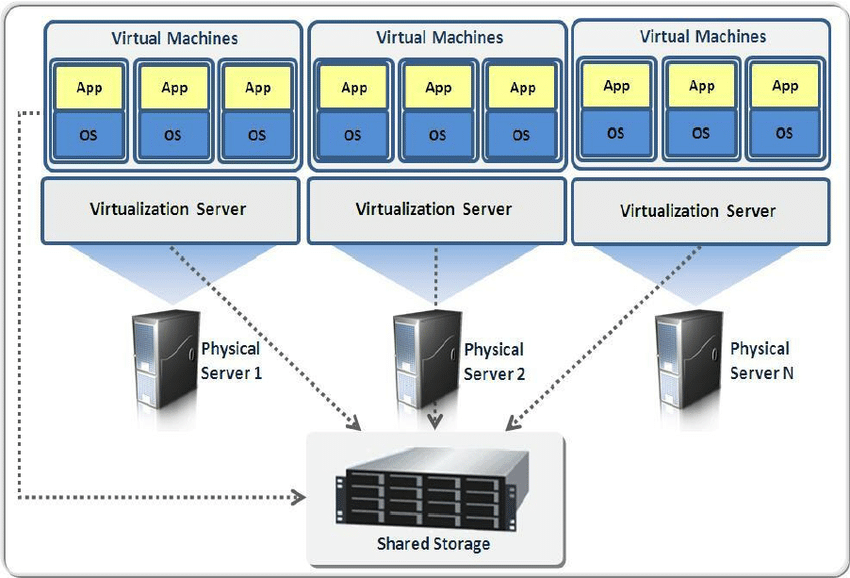
Virtualization typically relies on a hypervisor, a thin software layer that sits between hardware and operating systems. The hypervisor allocates CPU, memory, storage, and networking dynamically, ensuring each virtual machine (VM) operates independently.
Over time, virtualization technology evolved far beyond simple server consolidation. Today, it underpins cloud computing, DevOps pipelines, disaster recovery strategies, cybersecurity sandboxes, and even edge computing deployments.
If you’ve ever launched a cloud instance, tested software in a sandbox, or recovered a system snapshot after a bad update—you’ve already benefited from virtualization technology, whether you realized it or not.
Why Virtualization Technology Became Non-Negotiable in Modern IT
There was a time when running one application per server made sense. Hardware was expensive, workloads were predictable, and downtime—while painful—was accepted as part of the game. That world no longer exists.
Today’s systems demand speed, flexibility, and resilience. Virtualization technology rose not because it was trendy, but because physical infrastructure simply couldn’t keep up with modern expectations.
From a business standpoint, the benefits compound quickly.
First, utilization skyrockets. Traditional servers often ran at 10–15% capacity. Virtualized environments routinely push 60–80% utilization without sacrificing stability. That’s real money saved, not theoretical efficiency.
Second, deployment timelines collapse. What once required procurement, racking, cabling, and manual configuration can now happen in minutes. When leadership asks for a new environment by tomorrow, virtualization makes that request realistic instead of reckless.
Third, risk drops dramatically. Snapshots, live migration, high availability clusters, and failover mechanisms mean outages no longer have to be catastrophic. Mistakes become recoverable events rather than career-limiting disasters.
From an operational perspective, virtualization technology also unlocks:
- Standardized environments across dev, test, and production
- Faster patching and rollback cycles
- Hardware independence that prevents vendor lock-in
- Easier compliance through isolation and auditing
But perhaps the most overlooked benefit is psychological. Teams working in virtualized environments experiment more. They test boldly. They innovate faster because the cost of failure is lower.
In my experience, organizations that resist virtualization aren’t being cautious—they’re unknowingly accepting higher long-term risk, slower growth, and unnecessary complexity.
How Virtualization Technology Actually Works (Without the Hand-Waving)
Let’s peel back the abstraction layer.
At the bottom, you have physical hardware: CPU, RAM, storage, network interfaces. Above that sits the hypervisor, which could be bare-metal (Type 1) or hosted on an operating system (Type 2).
The hypervisor’s job is deceptively complex. It must:
- Allocate CPU cycles fairly and efficiently
- Virtualize memory so each VM believes it has contiguous RAM
- Abstract storage into virtual disks
- Emulate or pass through network interfaces
- Enforce isolation so one VM can’t harm another
Type 1 hypervisors run directly on hardware and are used in production data centers. Type 2 hypervisors run on top of an existing OS and are common for development or testing.
Once the hypervisor is in place, virtual machines are created. Each VM includes:
- A virtual CPU configuration
- Assigned memory
- Virtual storage disks
- A guest operating system
- Applications and services
To the operating system inside the VM, the environment appears completely real. That illusion is what makes virtualization technology so powerful—and so versatile.
Modern platforms add layers of orchestration, automation, and policy control. Resource pools, templates, snapshots, live migration, and high availability features transform individual VMs into a cohesive, resilient system.
This is also where virtualization quietly intersects with cloud computing. Public cloud providers didn’t invent virtualization—they industrialized it at scale.
Real-World Benefits and Use Cases of Virtualization Technology
Virtualization technology isn’t a single-use tool. It’s a foundation that supports wildly different outcomes depending on how it’s applied.
In enterprise IT, virtualization enables server consolidation, disaster recovery, and business continuity. Instead of maintaining duplicate hardware, organizations replicate virtual machines to secondary sites, ready to fail over instantly.
In software development, virtualization allows teams to mirror production environments precisely. Bugs that once appeared “only on the live server” become reproducible and fixable.
In cybersecurity, virtualization creates isolated sandboxes for malware analysis and penetration testing. Analysts can detonate suspicious files without risking the broader network.
In education and training, students experiment freely without fear of breaking shared systems. Snapshots reset environments in seconds.
Even small businesses benefit. Virtualization lets startups look enterprise-grade without enterprise budgets. One well-configured host can replace an entire server closet.
Before virtualization, scaling meant buying hardware and hoping you guessed right. After virtualization, scaling becomes incremental, measured, and reversible.
That “before vs after” difference is why virtualization technology continues to spread into new domains, including edge computing, IoT gateways, and virtual desktop infrastructure (VDI).
A Practical, Step-by-Step Guide to Implementing Virtualization Technology
Virtualization success isn’t about picking a platform and hoping for the best. It’s about making deliberate decisions at each stage.
Start by assessing workloads. Not everything needs to be virtualized immediately. Identify systems that benefit most: underutilized servers, environments needing high availability, or systems requiring rapid provisioning.
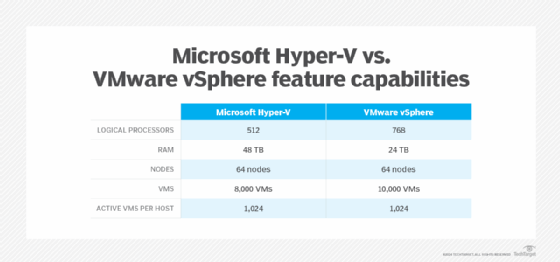
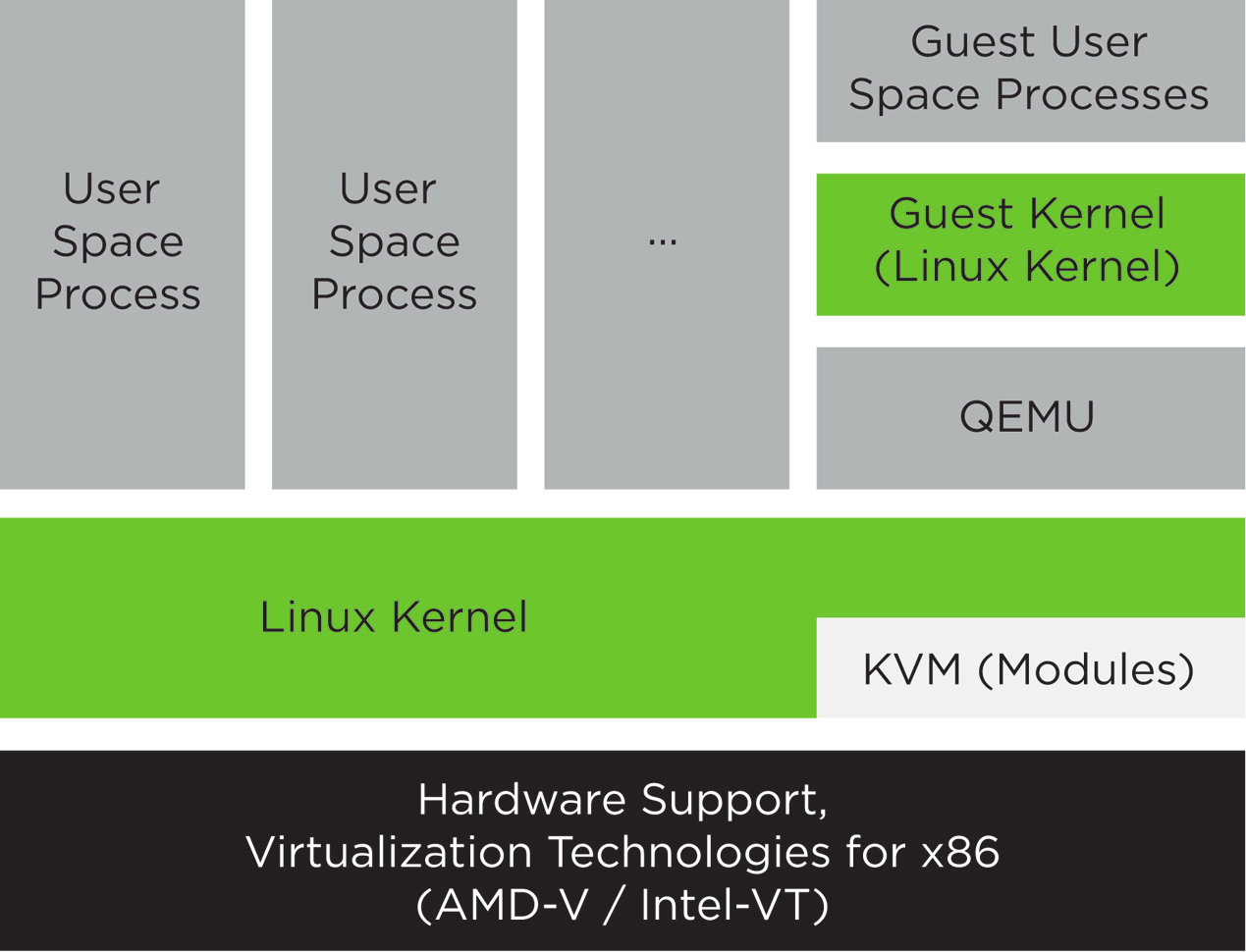
Next, choose the right hypervisor. Production environments typically rely on platforms like VMware, Microsoft Hyper-V, or KVM. Each has strengths, trade-offs, and ecosystem implications.
Then design the host infrastructure. CPU cores, memory capacity, storage performance, and network redundancy matter far more in virtualized environments because everything shares the same foundation.
After that, create standardized templates. Golden images reduce configuration drift and speed deployment. This is where discipline pays off long-term.
Implement monitoring early. Virtualization hides problems until they cascade. Resource contention, storage latency, and snapshot sprawl are silent killers without visibility.
Finally, plan for growth. Virtualization technology rewards foresight. Leave headroom, document configurations, and revisit assumptions regularly.
The biggest mistake I see isn’t technical—it’s treating virtualization as a one-time project instead of a living system.
Tools, Platforms, and Expert Recommendations That Actually Hold Up
No virtualization discussion is complete without honest tool comparisons.
VMware remains the gold standard for enterprise features, ecosystem maturity, and reliability. Its tooling excels in complex environments but comes at a premium cost.
Hyper-V integrates seamlessly into Windows-centric organizations. Licensing can be attractive if you’re already invested in Microsoft infrastructure, though advanced features may require additional tooling.
KVM powers much of the cloud world quietly and efficiently. It’s flexible, performant, and open-source, but demands stronger Linux expertise.
For cloud-based virtualization, providers like Amazon Web Services abstract much of the complexity, trading control for convenience.
Containers—popularized by Docker—aren’t a replacement for virtualization, but a complementary layer. In practice, most production container platforms still run on top of virtual machines.
My advice after years of deployments: choose boring, proven tools unless you have a compelling reason not to. Virtualization rewards stability more than novelty.
Common Virtualization Technology Mistakes (And How to Avoid Them)
The most common mistake is overcommitting resources without understanding workload behavior. Virtual CPUs and memory feel infinite—until they’re not.
Another frequent issue is snapshot abuse. Snapshots are safety nets, not long-term backups. Left unmanaged, they degrade performance and complicate recovery.
Neglecting storage design is another classic failure. Virtualization concentrates I/O. Cheap disks quickly become bottlenecks.
Security missteps also happen. Just because systems are isolated doesn’t mean they’re secure. Patch management, network segmentation, and access controls still matter.
The fix for most of these issues is awareness, monitoring, and disciplined processes—not more hardware.

The Future of Virtualization Technology (And Why It’s Still Growing)
Some claim virtualization is “old news” because containers and serverless stole the spotlight. That misunderstands the stack.
Virtualization technology didn’t disappear—it became invisible. It’s the quiet layer making everything above it possible.
Edge computing, AI workloads, hybrid cloud strategies, and regulated industries all rely on virtualization’s isolation and control. As hardware becomes more powerful, virtualization becomes even more efficient.
In other words, virtualization isn’t fading—it’s maturing.
Final Thoughts: Why Virtualization Technology Is Still Worth Mastering
Virtualization technology isn’t exciting because it’s flashy. It’s exciting because it works—quietly, reliably, and at scale.
If you understand it deeply, you gain leverage. You move faster, recover quicker, and build systems that adapt instead of breaking.
Whether you’re an IT leader, developer, or business owner, mastering virtualization isn’t optional anymore. It’s foundational.
If you want a solid visual explainer, this YouTube overview breaks the concepts down cleanly:
FAQs
What is virtualization technology in simple terms?
It’s software that lets one physical computer safely act like many separate computers.
Is virtualization the same as cloud computing?
No. Cloud computing uses virtualization, but virtualization can exist without the cloud.
Does virtualization hurt performance?
Modern virtualization has minimal overhead when properly configured.
Can small businesses use virtualization technology?
Absolutely. It often reduces costs and complexity long-term.
What’s the difference between VMs and containers?
VMs virtualize hardware; containers virtualize applications. They solve different problems.

Adrian Cole is a technology researcher and AI content specialist with more than seven years of experience studying automation, machine learning models, and digital innovation. He has worked with multiple tech startups as a consultant, helping them adopt smarter tools and build data-driven systems. Adrian writes simple, clear, and practical explanations of complex tech topics so readers can easily understand the future of AI.